
Skip to content

PRIVACY AND SECURITY

Security boundariesyou can explain.

Side Whisper keeps your browsing and your voice on your PC. The account service handles sign-in, your plan, your devices and, with Pro, a synced copy of your sidebar and settings. This page shows what stays where, and how web content is kept at arm’s length.

Account serviceSign-in, account database, hosting and email delivery, with server-side checks on every protected action
Desktop appContext isolation, sandboxed renderers, minimal preload bridges and typed IPC
VoiceRecording, transcription, correction and paste all happen on your PC
TelemetryNo automatic desktop usage analytics, and no uploaded crash dumps or game metrics

01 — THE BOUNDARIES

What is trusted, what is isolated, and what stays local.

01

Your account

Sign-in proves who you are. The account service then checks your user, plan and device permissions on the server for every protected action.

02

Downloads and plan changes

Build downloads, device changes and plan changes each check access on their own, so one allowed step never opens another.

03

Websites stay outside the app

Web content runs in sandboxed, isolated renderers. It never receives the privileged bridge the app uses for its own windows.

04

Your data stays local

Browsing history, website sessions and cookies, site permissions, recordings, transcripts and game telemetry stay on your PC. With Pro, Sync copies your sidebar, templates, themes, Dictionary, Snippets and portable settings to your account.

05

Sign-in and abuse protection

Sign-in codes expire after 10 minutes, allow three tries and are stored hashed. Sign-in is rate limited per address and per network.

06

Release integrity

Side Whisper ships through the Microsoft Store, which checks, signs and delivers every update.

02 — WHAT STAYS ON YOUR PC

The account service does not need your browsing life.

It exists for identity, consent, your plan, your devices and, with Pro, Sync. Sync never carries browsing history, website cookies, transcripts or performance data.

What does leave your PC on its own: text you type in the address bar, Add link and Quick Search goes to DuckDuckGo for suggestions, and the ad blocker downloads its filter lists when Side Whisper starts. The Privacy Policy lists every case.

No uploaded browsing history or page content
No uploaded website-session exports
No uploaded microphone recordings or transcripts
No automatic desktop usage analytics
No uploaded crash dumps
No uploaded FPS, GPU, CPU, RAM or temperature telemetry

03 — CONTROLS YOU CAN SEE

Ad blocking and site permissions, in plain view.

If a control can’t be enforced, it isn’t shown. If a number isn’t available, it isn’t guessed.

AD BLOCKING

One switch, with a real count.

Blocking uses the Ghostery engine with the ad lists from EasyList, Peter Lowe and uBlock Origin. The shield in the toolbar turns it on or off, and shows how many requests it actually blocked across your sites.
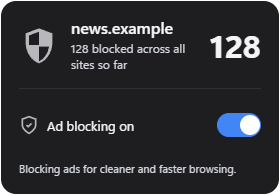
The ad blocking popup on news.example: 128 requests blocked across all sites so far, ad blocking on

It blocks network requests only, so pages are never restyled. Lists are pinned, checked against a SHA-256 hash and updated with the app.
SITE PERMISSIONS

You answer every request.

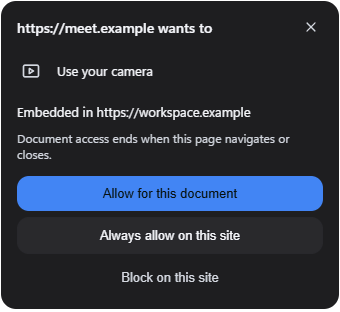
When a site asks for the camera, notifications or screen sharing, Side Whisper asks you first, and each answer does exactly what it says.

A site asking to use the camera, with Allow for this document, Always allow on this site and Block on this site

Closing the prompt saves no choice. Site settings list every site as Ask, Allowed or Blocked, and can reset permissions.

PANIC BUTTON

One key to cover the page.

Turn it on in Settings, then press Alt+Shift+H. Side Whisper closes browser popups, mutes the active browser window and covers its page with a safe page you chose. Press the key again to restore everything.

Free, and off by default. It covers the page, not the tabs or the address bar.

04 — WHERE EACH THING LIVES

Two lists. Nothing in between.

What the account service stores

  • Your email address, and your name and picture if you sign in with Google
  • Your consent to the Terms and Privacy Policy, and your product news choice
  • Your plan, with Paddle's references for your purchases
  • Where you are signed in: each PC's name, and each session's IP address and browser
  • With Pro, Sync: your sidebar, templates, themes, Dictionary, Snippets and portable settings

What never leaves your PC

  • Browsing history, cookies and website sessions
  • Site permissions
  • Voice recordings and transcripts
  • Game telemetry
  • Shortcuts and settings tied to one PC
  • Separate app accounts and open tabs

05 — HOW THE WEBSITE IS SECURED

Security is a maintained checklist, not a launch badge.

The website follows current guidance for its framework and sign-in provider and the OWASP ASVS 5.0 requirements, and the app follows Microsoft Store policy.

A strict Content Security Policy, HTTPS only, and no framing by other sites
Server-side checks on every protected action, never trust in the browser
Rate limits at the edge and again in the account service
Sign-in codes stored as hashes, three tries each, gone after ten minutes
Answers that never reveal whether an email address has an account
No keys in the website’s code: secrets live in the hosting providers’ stores
Read the security guide

RESPONSIBLE DISCLOSURE

Found a vulnerability?

Please tell us privately before you share it publicly. Email support@sidewhisper.app with the steps to reproduce it.

This page describes the current architecture and the intent behind it. It is not a certification, a penetration-test report, a warranty, or a guarantee that a vulnerability cannot exist.

SEE FOR YOURSELF

Private by default.
Free to start.

  • Free, no time limit
  • No account needed
  • Windows 10 and 11
