
Your words stayon your machine.
Press Alt+A, speak, and Side Whisper pastes the text into the app you are using. Whisper, Moonshine and Parakeet models run on your PC, so recordings and transcripts are never uploaded.

Pick a model once. Dictate anywhere.
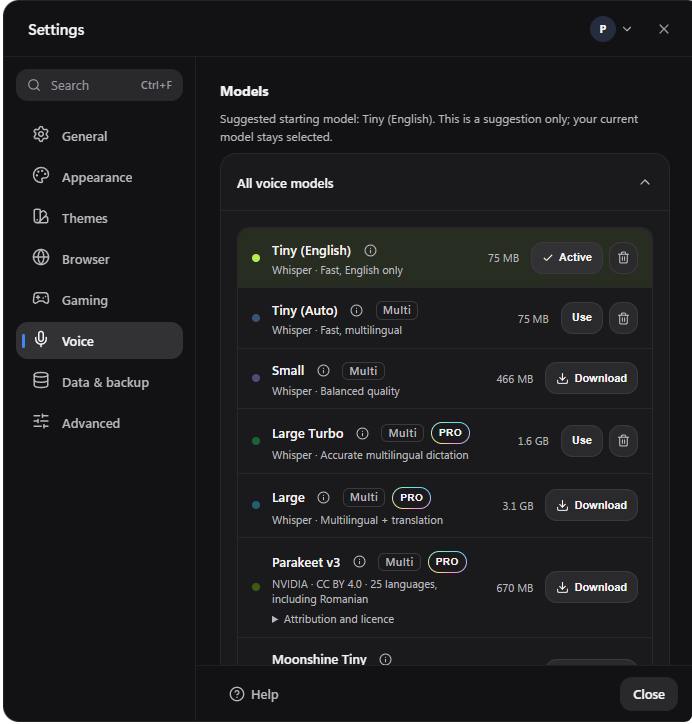
Models
Seven offline models, four of them free
A model downloads only when you choose it. Switch the active one with a click, and delete the ones you no longer use.
01 — THE LOCAL PIPELINE
Record. Transcribe. Refine. Paste.
Every step happens on your PC.
Record
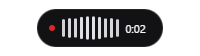
Press Alt+A to start and again to stop. A compact overlay shows live audio activity.
Transcribe
One of seven models turns speech into text on your PC. Large Turbo, Large and Parakeet v3 need Pro.
Refine
Dictionary entries fix names and acronyms. Then saved Snippet triggers expand into longer text.
Paste
Copy the result, or auto-paste it with Ctrl+V into the app in front of you.
WORKS IN ANY APP
Dictate where you already work.
Auto-paste sends Ctrl+V to the window in front of you, so it works in any app that accepts a paste: email, chat, documents and code editors. Prefer to check first? Set it to copy only and paste yourself.
The final text can remain in Windows clipboard history or in the destination app. Those systems decide that, not Side Whisper.
02 — PRIVACY BOUNDARY
No Side Whisper cloud transcription service.
Audio is recorded, converted, transcribed, corrected and expanded on your PC. Temporary files are removed during normal operation.
03 — MODELS
Choose speed, language reach and accuracy.
Smaller models start faster and use less memory. Larger ones are more accurate, most of all in languages other than English. Every model runs on the CPU.
Settings show each model’s storage size and a recommended amount of RAM before you download it. Downloads continue if you close Settings, and a Windows notification tells you when they finish. Each model’s licence is shown in Settings. Parakeet is CC BY 4.0, with NVIDIA attribution.
| Model | Good for | Languages | Plan |
|---|---|---|---|
| Tiny (English) | Fastest, English only | English | Free |
| Tiny (Auto) | Fast, detects the language | Multilingual, translate to English | Free |
| Small | Balanced quality | Multilingual, translate to English | Free |
| Moonshine Tiny | Light, quick English dictation | English | Free |
| Large Turbo | Accurate and quick | Multilingual | Pro |
| Large | The most accurate Whisper model | Multilingual, translate to English | Pro |
| NVIDIA Parakeet v3 | Accurate European languages | 25 languages including Romanian, auto-detect | Pro |
04 — PERSONAL RECOGNITION
Correct once. Expand every time.
Dictionary fixes what recognition gets wrong. Snippets turn a short phrase into a longer block.
Voice Dictionary
Correct names, product terms, acronyms and recurring mistakes after transcription.
“we shipped side whisper to the store”
We shipped Side Whisper to the store.
Voice Snippets
Turn a short spoken trigger into a longer saved block before the text is pasted.
“sig”
Best regards,
Alex Doe
Product design
Move Dictionary and Snippets as separate JSON files, without bundling unrelated settings.
Free keeps up to 25 Dictionary entries and 25 Snippets. Pro has no limit.
Voice, answered.
More in the voice guide.
Which languages does dictation support?
It depends on the model. Tiny (English) and Moonshine Tiny are English only. The multilingual Whisper models, Tiny (Auto), Small, Large Turbo and Large, let you pick from 37 languages or detect the language on their own, and all but Large Turbo can translate what you say into English. NVIDIA Parakeet v3 covers 25 European languages and detects them automatically.
Does it support Romanian?
Yes. Romanian works with every multilingual model: Tiny (Auto) and Small on Free, and Large Turbo, Large and NVIDIA Parakeet v3 on Pro.
Does dictation need the internet?
No. You need the internet only to download a model you choose; transcription then runs on your PC.
How much RAM does a model need?
Settings show each model’s storage size and a recommended amount of RAM before you download it. Treat the RAM figure as guidance, not a measured minimum.
Do I need an NVIDIA graphics card?
No. Models run on the CPU of a 64-bit Windows PC. Parakeet and Moonshine do not need an NVIDIA GPU or CUDA.
Can I change the shortcut?
Yes. The default is Alt+A, and you can set another one in Settings, under General and Keyboard shortcuts. Dictation always keeps a shortcut: it is the one that cannot be turned off.
TRY IT
Say it once.
Keep it on your PC.
- Free, no time limit
- No account needed
- Windows 10 and 11